
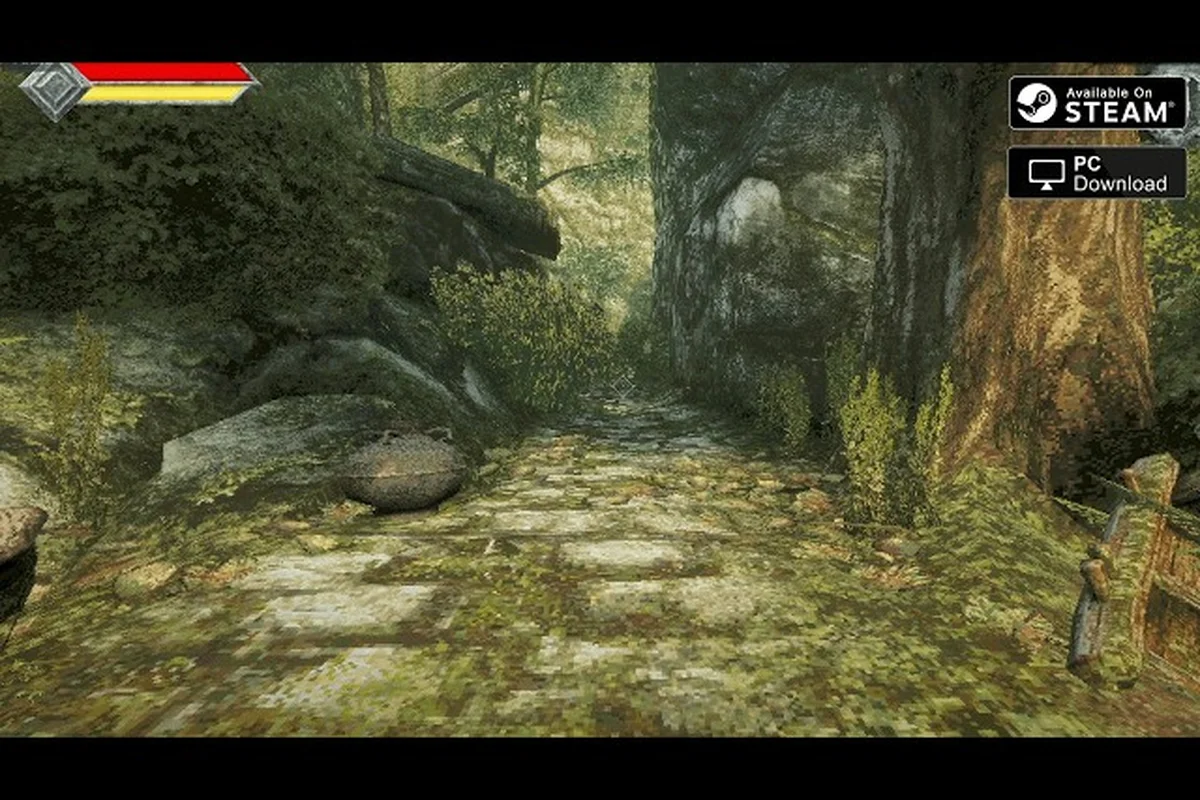
Before buying Queen's Domain, check the published PC specs, the small download, and the Steam Deck verification. The one-hour demo gives you a practical way to test the game's performance and core systems before committing to the full release.
Queen's Domain Minimum and Recommended PC Specs
The official system requirements for Queen's Domain are modest for a modern PC. The minimum configuration targets Windows 10 64-bit systems with a quad-core Intel i5 at 2.5 GHz, 4 GB of RAM, and either a GTX 760 or RX 560 graphics card. DirectX 11 is required, and the game needs 1500 MB of available storage. The recommended configuration raises the processor target to a 3.5 GHz quad-core i5, increases memory to 6 GB, and recommends a GTX 1060 or RX 580.
The important detail is that these are published minimum and recommended specifications, not promises about frame rate. Queen's Domain uses a first-person retro-fantasy presentation with stamina-driven melee combat, thrown weapons, and flight-based traversal across an interconnected island. Those systems can affect performance, but the developer has not published a target frame rate, resolution scaling information, or detailed benchmark results as of 2026-10-31.
| Component | Minimum specification | Recommended specification |
|---|---|---|
| Operating system | Windows 10 64-bit | Windows 10 64-bit |
| Processor | Intel i5 quad-core, 2.5 GHz | Intel i5 quad-core, 3.5 GHz |
| Memory | 4 GB RAM | 6 GB RAM |
| Graphics | GTX 760 or RX 560 | GTX 1060 or RX 580 |
| API | DirectX 11 | DirectX 11 |
| Storage | 1500 MB | 1500 MB |
What the minimum specs really mean
The minimum tier is best treated as a compatibility floor. A system with 4 GB of RAM has less room for background applications than the recommended 6 GB configuration, especially if browsers, voice chat, launchers, or recording tools are running. If you plan to play with other programs open, closing unnecessary applications before launching is a sensible first test.
The GTX 760 and RX 560 comparison also depends on the rest of the machine. A current CPU and fast storage can help, but they cannot compensate for a graphics card that struggles with the game's rendering workload. Since exact performance targets are not documented as of 2026-10-31, use the official specifications as a screening tool and then judge actual smoothness in the demo.
How to check your PC before downloading
Use a short verification process that takes only a few minutes:
-
Confirm that your operating system is 64-bit Windows 10.
-
Open the system information panel and check the processor model and clock speed.
-
Check installed memory rather than the total advertised by the computer manufacturer.
-
Compare your graphics card with both supported minimum-tier options.
-
Make sure the target drive has at least 1500 MB free for installation and temporary files.
-
Close heavy background programs before starting the demo.
Players who want help understanding the game's exploration, stamina-based combat, and upgradeable flight tool can use the Queen's Domain beginner guide alongside this hardware check. The demo is especially useful because a short session may expose problems with your display, controls, or graphics driver before you install the full game.
The 1500 MB Download and What It Implies
The published download size for Queen's Domain is 1500 MB, a compact footprint compared with most modern action RPGs. That figure applies to the PC version and should make the demo a relatively convenient test, although temporary files, platform overhead, and any separate demo data may affect the total space your drive actually uses.
A small download does not automatically mean low system requirements. Storage size and processing demand are separate measurements: a compact game can still require a modern processor, adequate memory, and a compatible graphics card. Conversely, the 1500 MB figure gives you a clear expectation that download time should be modest on a reasonably fast connection, while the published hardware specifications remain the more important purchase decision.
| Storage question | Practical answer |
|---|---|
| Official storage requirement | 1500 MB |
| Free space to reserve | More than 1500 MB for installation and temporary data |
| Best drive type | SSD preferred for load times, though SSD speed is not an official requirement |
| Download size concern | Small relative to many modern PC releases |
| Main hardware concern | CPU, RAM, graphics card, and DirectX 11 support |
1500 MB is a size estimate, not a speed promise
No official bandwidth figure, average download time, or minimum internet speed has been published as of 2026-10-31. The storage requirement also does not tell you how quickly the game will run after installation. You should separate three questions: Can your PC store the game? Can it launch it? Can it maintain a smooth play experience at your preferred resolution?
That distinction matters when you read community reports or retailer comparisons. A report that the game launches on a particular machine does not establish official minimum specifications, and a report that it runs smoothly does not prove that every minimum-tier PC will deliver the same experience. For the Queen's Domain download size, the official 1500 MB figure is the firm number; everything about download speed and frame rate should be verified locally.
How much room should you keep?
Reserve at least 2 GB of free space for the installation itself. More generous free space is preferable if you use the demo and full release on the same system, enable Steam Cloud, or expect platform-managed temporary files to remain during an update. The full release may be larger than the demo because the demo is only a portion of the experience, but its exact separate size is not documented as of 2026-10-31.
The Queen's Domain update guide is useful after installation because version 1.01.01 addressed several launch problems, including a Pit of Despair soft lock and a freeze when weapons evolve. Updating before judging performance can prevent an early technical issue from being mistaken for an issue with your hardware.
Deck Verified Versus the Published Specs
Queen's Domain is Steam Deck Verified, and the official Steam news feed also identifies it as Steam Machine Verified. Full controller support is documented, including DualShock and DualSense controllers. That status is useful information, but it is not a promise that every device configuration will deliver identical performance.
The published PC requirements and handheld verification answer different questions. The PC specifications tell you which hardware combinations are supported. Steam Deck Verified tells you that Valve has reviewed the game for the Deck's standard operating environment. Neither source provides a frame-rate table, battery-life estimate, or resolution setting, so direct comparisons should focus on compatibility rather than unsupported performance claims.
| Platform or device | Documented status | What to verify locally |
|---|---|---|
| Windows PC | Minimum and recommended specifications published | Resolution, frame pacing, and stability |
| Steam Deck | Steam Deck Verified | Visual clarity, controller comfort, and sustained play |
| Steam Machine | Steam Machine Verified | Performance under the exact configuration |
| PS5 | Released on October 30, 2026 | Platform-specific settings are not documented here |
| Xbox Series | Released on October 30, 2026 | Platform-specific settings are not documented here |
| Nintendo Switch 2 | Released on October 30, 2026 | Platform-specific settings are not documented here |
Why Deck Verified still requires a hands-on test
Handheld screens make small interface elements and dark areas easier to struggle with. The official launch trailer shows first-person island exploration, flight across gaps, stamina-based melee attacks, thrown weapons, and a retro-fantasy visual style, but it does not publish menu-size, brightness, or performance settings. Those details remain something you must verify in the demo.
On the Deck, begin with the default configuration before changing anything. Walk through a safe area, test the menus, enter a weapon fight, and cross a flight gap if the demo reaches one. That sequence checks ordinary exploration, interface readability, combat input, and the movement mechanic most likely to stress the system. If the image feels unclear, compare the available display options in-game; a specific recommended setting is not documented as of 2026-10-31.
Comparing a desktop and a handheld
A desktop with the GTX 1060 or RX 580 has more conventional graphics hardware than a Steam Deck, but raw specifications alone cannot determine the better experience. A high-resolution desktop may demand more from the graphics card, while the Deck's fixed display creates a different readability test. The official specs give you a baseline, and the demo provides the practical evidence.
| Decision factor | Desktop PC | Steam Deck |
|---|---|---|
| Upgrade flexibility | Usually greater | Fixed handheld configuration |
| Screen size | Depends on the display | Integrated 7.4-inch screen |
| Input method | Keyboard, mouse, or controller | Built-in controller |
| Performance data | Published baseline specs | Deck Verified status, without a frame-rate target |
| Best purchase test | Run the demo at your intended resolution | Check readability and sustained play on-device |
For related hardware-independent information, the Queen's Domain loadout overview can help you understand the types of combat equipment you may encounter. Its value for system testing is practical: you can compare the responsiveness of different melee weapons without mistaking an unfamiliar attack animation for a performance problem.
The One-Hour Queen's Domain Demo: What It Covers
The Queen's Domain demo gives players roughly one hour of play, making it useful for checking installation, performance, controls, and the early portion of the action RPG loop. It should not be treated as a complete preview of the full game. The developer describes the release as an experience of at least 40+ hours, and the demo covers only a limited slice of that content.
This Queens Domain demo guide separates confirmed information from common assumptions. It is known that the demo has received hotfixes, and enemies killed before death do not respawn when a player continues from a save. That continue rule gives the demo more value for testing progression because dead enemies stay dead during the continued session.
| Demo evaluation goal | What to test | Confirmed limitation |
|---|---|---|
| Hardware performance | Movement, combat, menus, and frame pacing | No target frame rate is documented |
| Controller handling | Stamina attacks, movement, and menu navigation | Keybindings are not documented |
| Visual quality | Text clarity, darkness, and interface scale | Graphics presets are not documented |
| Progression | XP, equipment, and continued play | Full campaign length is not included |
| Save behavior | Death and continue behavior | Enemies killed before death do not respawn |
A practical one-hour test plan
Start the demo with your intended settings and record the first point at which performance becomes inconsistent. Explore normally for several minutes, then test the combat systems that make up the game's core loop: stamina-based melee attacks, charge attacks, weapon-specific specials, and secondary throwing weapons. The game has more than 50 melee weapon types and over 20 secondary throwing weapon types, so even a short session can show whether input feels responsive.
Next, test traversal if the demo permits it. Flight is the main way to cross platform gaps, and upgrading the Legendary Holy Sword Endu extends flight distance. Check whether the camera communicates height and landing direction clearly on your display. Because exact demo boundaries are not documented as of 2026-10-31, you should not assume that every later region, enemy type, or upgrade appears within the hour.
Save and continue before testing again. This confirms that the game handles your storage location and progression state correctly. It also lets you observe the documented no-respawn rule for enemies defeated before death. A smooth restart is more relevant to the actual play experience than checking only the opening area.
What the demo cannot confirm
The demo cannot establish the full download size of the release, total completion time, late-game performance, or the behavior of every boss and mini-boss. The world contains more than 100 enemies, mini bosses, and bosses combined, but their individual names and complete locations are not documented as of 2026-10-31. You also cannot use the demo to judge the final stability of every route or shortcut.
It is particularly important not to treat achievement names as a checklist of regions. Only ten of the game's 53 Steam achievement display names are public, and the unlock conditions for all 53 remain undocumented as of 2026-10-31. The public achievement overview provides the confirmed names without inventing categories or relationships.
Settings and Options You Must Verify In Game
Queen's Domain has detailed published PC requirements, but its graphics options, keybindings, difficulty settings, and healing rules are not documented as of 2026-10-31. This is an important limitation for anyone deciding whether to buy based on the demo. A smooth first session does not prove that every visual setting, control arrangement, or difficulty behavior has been finalized.
Use the demo as a controlled test rather than assuming missing information from a generic action RPG. Record your hardware, operating system, resolution, and display mode before you begin. Then change one setting at a time so you can identify what improves clarity or performance without creating unnecessary variables.
| Area to verify | Why it matters | Published status |
|---|---|---|
| Graphics presets | Affects clarity and performance | Not documented as of 2026-10-31 |
| Resolution and display mode | Influences workload and image quality | Not documented as of 2026-10-31 |
| Keybindings | Affects keyboard and mouse comfort | Not documented as of 2026-10-31 |
| Controller mapping | Affects DualShock and DualSense use | Full controller support is documented |
| Difficulty settings | Affects challenge and enemy behavior | Not documented as of 2026-10-31 |
| Healing rules | Affects food and life-point management | Food raises stats; exact healing rules are not documented |
Verify performance in a repeatable order
First, launch the game and remain in one safe area so you can record baseline stability. Next, enter combat and repeat the same actions, including attacks that drain stamina. Stamina management is central to the documented melee system, so a busy fight may reveal input or frame-pacing problems that idle exploration does not.
Third, test a flight sequence. Vertical movement, platform gaps, and long jumps can create different rendering loads from ground combat. Fourth, open the bestiary and scroll through entries with a controller; the developer specifically documents controller scrolling for this feature. Finally, trigger a death and continue to confirm save behavior.
Do not invent performance settings
The absence of published frame-rate targets does not justify assigning a specific resolution, quality preset, shadow setting, or texture scale. Even widely used settings can vary by display, driver, and device. If the official demo exposes a choice, test it; if it does not, leave it at the default and describe the result factually.
The same principle applies to difficulty and healing. Food raises character stats, and a life charm raises life points, but exact consumption rules and difficulty modifiers are not published. Verify those details in-game rather than filling the gaps with assumptions from other games.
A Practical Buy-or-Wait Checklist
You can make a confident decision by separating four questions: storage, compatibility, visual comfort, and demo coverage. Queen's Domain needs 1500 MB of storage, supports DirectX 11 on Windows 10 64-bit, and has Steam Deck and Steam Machine verification. Its PC specifications range from 4 GB RAM with a GTX 760 or RX 560 to 6 GB RAM with a GTX 1060 or RX 580.
| Decision | Buy with more confidence when | Wait when |
|---|---|---|
| PC compatibility | Your CPU, RAM, and GPU meet the recommended tier | Your hardware only barely clears the minimum and you cannot test the demo |
| Storage | Your drive has comfortable free space | Free space is tight or your drive has recurring issues |
| Steam Deck | The demo feels clear and stable on the built-in screen | Text or combat effects are difficult to read |
| General expectations | You accept that some settings are not documented | You need a confirmed frame-rate target or final graphics preset list |
A completed demo session gives more useful information than an hour of online speculation because it tests your exact PC, display, controller, and driver combination. The official Queen's Domain Steam news feed is also worth checking before installation, especially for launch fixes and demo hotfixes.
In short, the published requirements are clear enough for an initial hardware filter, the 1500 MB download makes the demo easy to try, and Deck Verified status is a positive signal for handheld compatibility. What the demo must still prove is how the game feels and performs on your specific equipment, particularly during combat, flight, menu navigation, and continued play.
Frequently Asked Questions
Does Queen's Domain support Steam Deck?
Yes. Queen's Domain is Steam Deck Verified, and the developer also identifies it as Steam Machine Verified. Full controller support is documented, including DualShock and DualSense controllers. No official frame-rate target, battery-life estimate, or recommended handheld graphics preset is published as of 2026-10-31, so the demo remains the best practical test for your device.
How much storage does Queen's Domain require?
The published storage requirement is 1500 MB. The Queens Domain download size is small relative to many modern action RPGs, but you should keep additional free space for installation files, temporary data, and future updates. The separate storage size of the demo is not documented as of 2026-10-31, and using the same drive for the demo and full release is the simplest option.
What are the recommended PC specs for Queen's Domain?
The recommended configuration calls for Windows 10 64-bit, an Intel i5 quad-core processor at 3.5 GHz, 6 GB of RAM, and either a GTX 1060 or RX 580 graphics card. DirectX 11 is also required. These figures identify the recommended hardware tier, but no official frame-rate target has been published as of 2026-10-31.
Is the Queen's Domain demo enough to judge performance?
It is useful for testing movement, combat, traversal, menu readability, controller input, and stability on your exact hardware. The demo provides roughly one hour of play, while the full release is described as an experience of at least 40+ hours. It cannot confirm late-game performance, every boss encounter, or the complete set of graphics settings because those details are not documented as of 2026-10-31.
Does the Queen's Domain demo include save and continue features?
Yes. A documented demo hotfix states that enemies killed before death do not respawn when you continue. This makes the demo practical for testing progression and save behavior. Before changing major settings, reach a stable save point, then examine the inventory, bestiary, flight traversal, and continued session so you can judge the experience consistently.